What if non-developers could edit code without ever reading it?
More people are building software with AI coding agents like Cursor and Claude Code. But they can't read the code those agents produce. Orma takes a Python file and renders it as a clickable flowchart in plain language. Users edit the flowchart directly by moving nodes, rewiring connections, and removing steps. Orma reads those changes and generates a structured prompt a coding agent can act on, no written explanation needed.
The user never reads code. The user never writes a prompt from scratch.
Non-developers are building with AI agents but flying blind in both directions.
Designers, PMs, and founders are using AI coding agents to build real products. The problem: they can't read the code the agent produces, so they don't know what exists to change, and they don't know how to phrase edits in a way the agent will execute reliably.
The agent built something. It works. But when you want to change it, you don't know what's there or where it lives.
"Change the button color" works. "Restructure the checkout flow" doesn't. The more complex the edit, the worse the result.
How might we turn code into something anyone can navigate and edit?
Forward translation is saturated. Backward translation is new.
Plenty of tools turn code into diagrams. That part is solved. The gap is the return trip: going from a diagram back to a precise, actionable prompt that a coding agent can execute reliably.
Code-to-diagram tools have existed for years. What's missing is diagram-to-prompt: the ability to click something in a visual interface and get back structured instructions an AI can act on.
The combination creates a bidirectional loop that didn't exist before. Forward translation (code → diagram) helps users understand what exists. Backward translation (diagram → prompt) lets them change it. Neither direction alone is the product.
Three features, three distinct problems to solve.
The interface had to solve understanding, reading in context, and expressing intent, in that order. Each feature handles one of those layers.
Code on the left, flowchart on the right. Hovering a node highlights the corresponding lines in the code panel, so users can see exactly where things live without reading the full file.
Each node is written in plain English so non-developers can read through the flowchart and understand what the code does. Function references are kept when one function calls another, so the structure stays accurate.
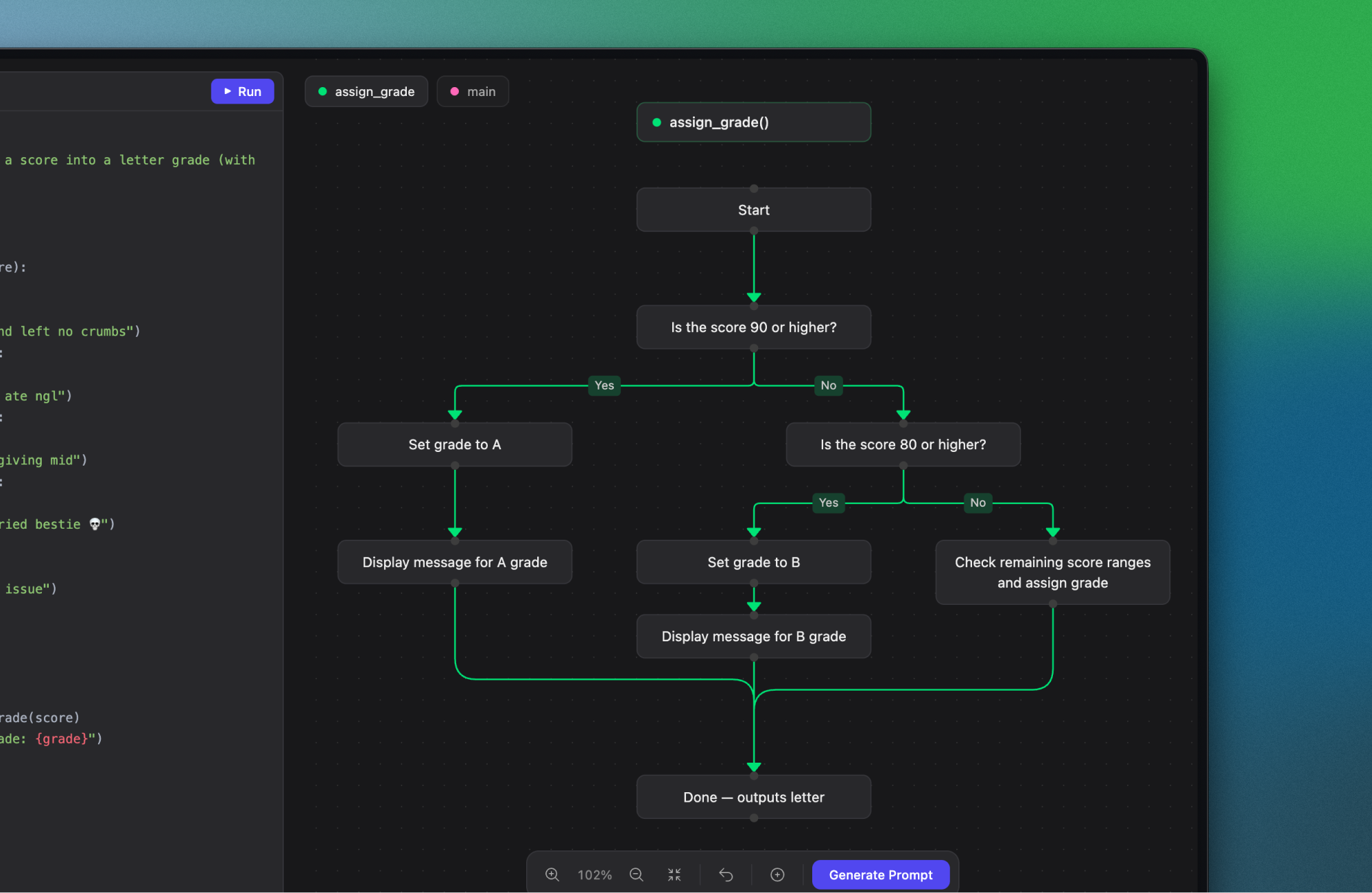
The flowchart is editable. Pull out a node, wire up a new connection, drop a step entirely. Orma reads those changes and generates a structured prompt a coding agent can act on, no written explanation needed.
Paste a Python file, get a diagram, click to edit.
Orma is a bidirectional interface between code and a coding agent. Drop in a Python file, get a visual flowchart in plain language, edit the flowchart to generate a structured prompt a coding agent can act on. The v1 scope is single files, the foundation for expanding to full codebases and other visualization types.
Try it at tryorma.vercel.appSee a Python file as a clickable flowchart labelled in plain language.
Hover a node to highlight the exact lines in the code panel without reading the full file.
Move nodes, rewire connections, drop steps. Orma reads the changes and generates a structured prompt ready to paste into Cursor or Claude Code.
What I learned
The flowchart gets attention, but the real value is the structured prompt. It's what makes edits land reliably. The visualization is just the interface to get there.
Flowcharts work well for linear Python scripts. Most real projects aren't linear, and they span dozens of files. The next hard problem is both: what's the right visual primitive for non-sequential, multi-file code?